
Return on investment (ROI) is the calculation that tells you if your project brought in more revenue than it cost. It can help you see whether a business video has helped you meet a specific business goal, usually one that ultimately ties to conversions or lifetime customer value. Here’s how to calculate ROI for your next video.
Although you can calculate ROI after-the-fact, the best time to use our free video ROI calculator tool is before you start a video project. The projections it delivers help you decide if the initial investment is worth making.
Before we get into the ROI calculator itself, we’ll take a look at common goals for different types of videos and the metrics you need to forecast your ROI for each one. Since lead generation is probably the most common objective we encounter, our web-based ROI calculator is designed to help you figure out your return on lead generation videos.
1. Identify your goal
Calculating video ROI can be tricky, but it is doable with the right information. The first step is identifying your goal. This helps you figure out what metrics to track and reach a value estimate for each metric.
To identify your video goal, consider what you want your video to accomplish and how it fits into your overall marketing strategy.
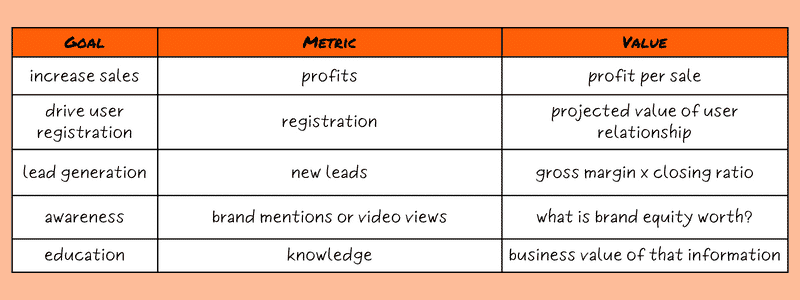
The five most common goals we encounter are:
- Generate Leads (common in B2B explainers)
- Increase Sales (common in B2C commercials)
- Drive User Registration (for SaaS companies)
- Boost Brand Awareness (common for B2C social media videos)
- Educate customers or employees (common in healthcare or training videos)
Savvy marketers may notice that some of these goals feed into each other. Boosting brand awareness could help you increase sales. Educating customers could drive user registration. Don’t fall into the trap of expecting a video to do everything though! Define your objective as narrowly as possible for each video campaign.

2. Match Metrics to Your Goals
Each goal is measured using a different metric or key performance indicator. Use the wrong metric and you’re likely to be disappointed by the results.
If your goal is increasing sales, your metric is likely to be the number of sales or total profit.
For the goal of driving user registration, your metric is registrations.
If you want to maximize lead generation, your metric is new leads, however they are qualified.
You’re almost certainly already tracking profits and registrations. Lead generation is easy to track too, but not automatic. Ideally, you’re using CRM software that monitors lead generation for you. If you don’t use a CRM, or the web-to-lead functionality isn’t available, you can use a website or conversion pixel to understand how video views translate into new leads.
Things get a little more tricky when we get to the last two goals on our list. There’s no specific number to reference, so you’ll have to extrapolate.
Brand mentions or video view count are good places to start if your goal is awareness. You might collect this information by:
- surveying potential customers
- monitoring searches of your brand name in Google Analytics and on social media
- setting up a Google Alert for your brand name
- monitoring video views and watch-through
If your goal is educating potential customers, your metric is knowledge. You might try adding a quiz at the end of your video or a simple survey that asks users to rate video helpfulness. Also pay attention to the kinds of questions customers are asking. Your video is working if it cuts down on customer queries about a specific topic.
In summary, the metrics you might be working with are:
- Number of sales
- Total profit
- New registrations
- New leads
- Brand mentions
- Video view count
- Time spent on customer support
3. Assign a Dollar Value to the Metric
Try to assign a dollar value to each metric. Some, like number of sales or total profit, are easier to value than others.
If your goal is user sign-ups, you can use the average lifetime value of a user relationship as your dollar value. For lead generation, multiply your gross margin by your closing ratio – the dollar value of each lead.
Pro Tip: Remember to use your gross margin, not your operating margin. Why? Because your cost for creating a video is fixed. Each additional sale brings you the gross margin in additional profit, not the operating margin.
Putting a dollar value on awareness can be tricky. It comes down to what brand equity is worth to you. There’s no perfect answer, but you might think about how much additional value is created by an increase in branded search or engagement.
As for education, you need to calculate the business value of the knowledge you’re spreading. For example: once upon a time we made a job safety video for a major oil company. They had told us that knowledge retention in their safety courses was as low as 10%, and they hoped our dynamic, entertaining approach would increase that retention. If we help prevent even one major injury at an oil site, those videos would easily deliver a positive return on investment.
4. Compare Performance
A/B testing is the gold standard for evaluating video performance. It helps you isolate the impact of your new video from other impacts on the market like seasonality or other marketing campaigns.
A standard A/B test delivers two different experiences to two sets of randomly assigned users. You might test a video-first experience against a text-based one or compare two video ads against each other.
Because A/B testing takes time and resources, it’s not always possible. Maybe your audience is small or you don’t want to dilute the impact of your video by only using it with half your audience.
When that is the case, you can compare two time periods instead. Choose a time before your video was launched and compare your metrics from that time with the time after the video launched. Make sure the timeframe you choose is long enough to offer a clear picture.
Also, make allowances for seasonal variations or other factors. For instance, if you’ve introduced a new website along with your video, both should share credit (or blame) for the results.
5. How to Calculate ROI for Your Video
The steps for calculating ROI look complicated, but they’re actually pretty straightforward. Before we break them down, a note on terminology. We use the word unit as short-hand for the smallest element of the metric you’re trying to measure. So your units could be users, dollars, leads, brand mentions, or informed users.
Step One: Find the value gained during the test period
You do this by subtracting your before metrics from your after metrics. So if you started with 25 users and ended up with 100, you’d subtract 25 from 100 to get 75 new users.
Then you multiply the dollar value of each unit by the number of new units. This shows the value you gained during the test period.

Step Two: Pro-rate this value
You may have run a 1-month test, but you want to know how much the video will increase net profit over the course of a year. To find the total gained value, divide the amortization period by the length of the test period and multiply by the gained value you found above.

Step three: calculate your return
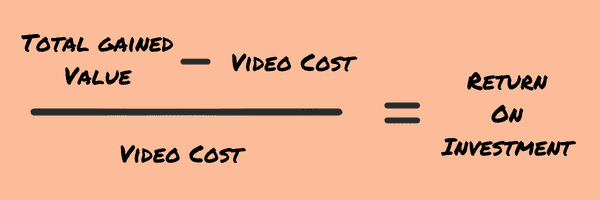
Finally, you calculate how these returns compare to your initial video investment. Do this by subtracting the video cost from the total gained value and dividing by the video cost.
Skip to the calculator to give it a try!
A Sample ROI Calculation
Let’s take a hypothetical business – a consultancy of some sort. Last year they received 1,000 leads, and closed 50, which means their closing ratio was 5%. They had 50 contracts, with an average value of $20,000, so their total revenue was $1,000,000. Their gross margin was 40%, and they made a video for $20,000.
What is the unit we are measuring?
A lead.
What is the dollar value of each unit?
40% Gross Margin x $20,000 average contract value x a closing ratio of 5% = $400
Let’s say they tested their new video for three months, year-over-year. In the ‘before’ period they received 250 leads. In the ‘after’ period they received 300 leads. So the Gained Value During Test Period was 50 leads multiplied by $400, or $20,000.
They expect their video will work for one year, so the Total Gained Value will be $80,000.
Finally, we subtract the video cost from the total returns and get $60,000. We divide that by the video’s cost of $20,000 to get 300% ROI – pretty good returns!
Is hoping for a 20% improvement in performance realistic? Your mileage may vary, but in our experience, yes. We’ve seen video boost conversions by as much as 63.9% for one cloud data services company.
Calculator for Lead Generation Videos
To make all of this even simpler, we’ve created a calculator that does the math for lead generation videos. We don’t collect data from these fields, so feel free to play around with different scenarios in privacy.
Directions: Establish two comparable periods over which to measure your results (before and after you introduce your video.) These periods should be long enough to provide good sample data, but not so long as to delay the receipt of the information beyond when it is useful. If your business has seasonality, consider using the same period from a past year.
For help figuring out what to enter in each field, check the input definitions below.
Input Definitions
Line 1: Gross profit margin is the percentage of your total revenues that is profit after your cost of goods sold (COGS) is deducted but before fixed expenses (overhead) are subtracted.
Line 2: Average Sale/Contract This is the average revenue from each of your sales or contracts. If you get a lot of repeat customers or recurring revenue, you might consider using average customer lifetime value for this field.
Line 3: Closing Rate – the percentage of your leads that become customers.
Line 4: Previous Number of Monthly Visitors – the number of monthly visitors that reached the page where your video will live, in the ‘before’ period.
Line 5: Subsequent Number of Monthly Visitors: This is the number of monthly visitors that reach the page where your video will live, in the ‘after’ period. This number should be greater than line 4 only if you anticipate that social media or email distribution of the video might drive new visitors to your site. Any increase in visitors will be attributed to the video.
Line 6: Previous Conversion Rate – the percentage of visitors to your page (line 4) that became leads in the ‘before’ period.
Line 7: Subsequent Conversion Rate – the percentage of visitors to your page that become leads, in the ‘after’ period.
Line 8: Amortization Period – the number of months over which the tool will calculate your returns. Enter a number that represents the likely life of the video. (we recommend 24 months)
Line 9. Cost of Video – how much you spent, or anticipate spending, on a video.
Output Definitions
Line 10. Additional gross revenue – This is the amount of additional sales that your video has created, or is likely to create. If you would like to make a spreadsheet to recreate this calculator and perhaps add additional inputs, here is how we make the calculation: =((5*7*3*2)-(4*6*3*2))*8
Line 11: Video ROI – the Return on Investment your video has yielded, or is likely to yield. Any amount greater than 0% is a positive return!
What to Do With This Information
With insight into projected additional gross revenue and video ROI, you can decide if you want to invest in video creation. You may want to compare the ROI of video against your predicted return on other marketing efforts, like blog posts or trade shows.
If this calculator has made you more confident about your chances of achieving positive ROI with an animated video, we’re here to help you make one. IdeaRocket creates videos in 2d animation, 3d animation, whiteboard and live action, as well as combinations of these techniques (mixed media.) Reach out to us.